Apple tv Remote
- 4.2
- Rating
- 10.00K
- Installs
- Free
- Price
 Analysis by App-foxy
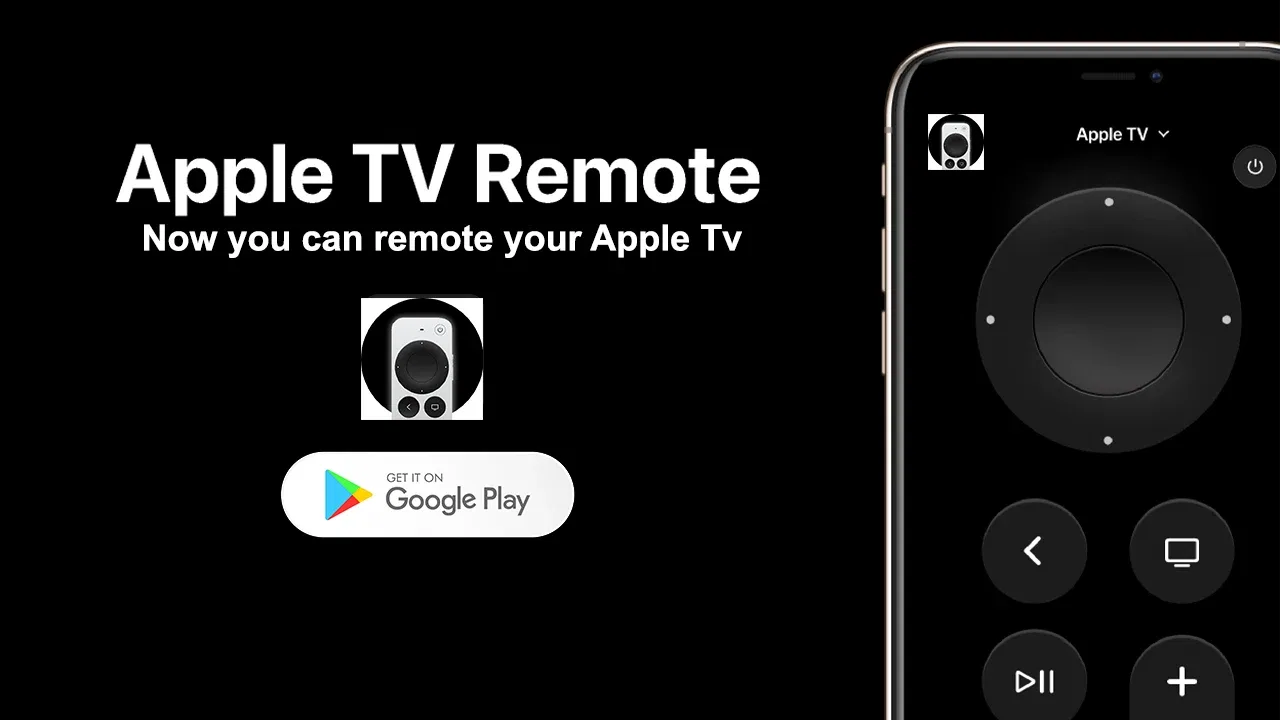
When the Apple TV remote is not where it should be, the television can suddenly feel much less useful. That is the problem Apple tv Remote, an Android app from kahlochSto, is designed to address: it turns a phone into a way to control an Apple TV. I found the idea immediately practical because a phone is usually easier to locate than a small remote, especially in a shared living room.
This is a free app in the Libraries & Demo category, with an Everyone content rating. It was released on June 8, 2024, and its current version is 101.0. The app supports Android 7.0 and newer, so it is aimed at a broad range of phones rather than only recent devices. Its average rating is 4.2 from around 700 ratings, and it has passed 10 thousand installs, which suggests that the simple remote-control use case has found a real audience.
Turning a phone into the remote you actually have with you
The central capability is straightforward: use your phone as an Apple TV remote instead of depending on the physical controller. That sounds like a small convenience, but it changes the experience in a very specific way. A phone is normally already in your hand, on a desk, or charging nearby. The remote may be under a cushion, in another room, or unavailable because somebody else is using it.
You May Also Like

 Blood Strike: 2.5 Anniversary
Blood Strike’s Loadouts Turn Every Drop Into a Tactical Gamble
A close look at Blood Strike’s custom loadouts: how fast access to signature weapons reshapes its battle royale rhythm, rewards preparation, and narrows the gap between fights.

 Pandora - Music & Podcasts
Pandora’s Music Is Easy to Start, but Harder to Recover
Pandora’s strength is its low-effort path from a seed to a station. Its weak spot is how much confidence it asks you to place in connection, setup, and quiet recovery.

 8 Ball Pool
 Is Built on Rivalries, Rematches, and Routine
A close look at the rivalries, rematches, shared routines, and unanswered safety questions that turn a quick pool match into a persistent mobile community.

 Samsung Music
’s Quiet Strength Is Playing What You Already Own
Its reach comes less from spectacle than from dependable access to a personal library. That simplicity is both the app’s strongest retention engine and its ceiling.

 AccuWeather: Weather Radar
AccuWeather Review: A Quick, Clear Forecast for Everyday Decisions
For everyday plans, the best forecast is the one you can understand quickly. AccuWeather makes rain timing, radar, and local conditions easy to act on, with a few trade-offs.

 Hill Climb Racing
Why Hill Climb Racing Still Turns Crashes Into One More Run
A tiny car, a bumpy hill and one more upgrade: Hill Climb Racing keeps resurfacing because its simple chaos makes every near-miss feel personal.
More From Our News Desk
View All News


In my experience, the strongest part of this concept is not that it replaces every aspect of the original remote. It is that it removes the interruption caused by losing access to the original one. If I want to pause a program while answering a message, adjust playback before leaving the room, or stop a video that has continued longer than expected, having the control on the same device I already carry can be more convenient than searching for another object.
The real benefit is availability, not novelty. Apple tv Remote is useful when the phone is close and the traditional remote is not. That distinction matters because it sets a realistic expectation: this is a practical backup and everyday controller, not automatically a complete replacement for every Apple TV setup.
The app is also easy to understand as a product. It does not ask the user to learn a complicated media-management system or a large library of content. Its purpose is narrow, and that narrow purpose is an advantage for anyone who wants a quick way to regain control of an Apple TV without adding another entertainment hub to the phone.
What the phone-based approach changes
A physical remote is dedicated, compact, and ready for the television. A phone-based remote is more flexible because it is part of a device people already use throughout the day. That creates a useful trade: the phone is easier to find and can be used from familiar surroundings, but it also has a battery, notifications, and other distractions.
I particularly like the phone approach for households where the remote moves constantly. In a family room, one person may leave it beside the sofa, another may carry it to the kitchen, and a third may accidentally place it under a blanket. A phone avoids some of that object-sharing friction. Each person can potentially use the device they already have, rather than waiting for the physical controller to come back.
There is another subtle advantage. A phone is easier to hold while doing something else. If I am checking a program, preparing food, or moving around the room, I am less likely to put it down and forget where it went. That makes the app feel less like an emergency substitute and more like a convenient secondary control method.
How I would use it in everyday practice
The first step is to install the app on a compatible Android phone and keep that phone connected to the same home setup used by the Apple TV. From there, the important practical question is whether the app can see and communicate with the intended Apple TV. If the device does not appear or respond, I would first check the phone’s connection, confirm that the Apple TV is awake, and make sure both devices are using the same local network environment.
That basic troubleshooting habit is worth adopting before assuming the app is broken. Remote-control apps depend on communication between devices, so a phone connected through a different network path may not behave like a phone sitting on the same home connection. I would also avoid testing for the first time during a film or live event. Setting it up while the television is idle gives you time to identify the correct device and understand the controls without pressure.
Once the connection is working, the useful workflow is simple: keep the phone nearby, open the controller when needed, and use it for the immediate action rather than treating it as a full replacement for the phone’s other functions. I found that this makes the app most valuable in short bursts. Pause, resume, navigate, or make a selection, then return to whatever else you were doing.
One non-obvious tip is to choose a consistent place for the phone when it is acting as the household remote. A charging stand near the sofa or a table beside the television makes the app more dependable. Without that habit, the phone can become just as hard to find as the original remote. The advantage comes from combining the software with a predictable location.
Another useful workflow is to use a spare Android phone as a dedicated controller, if one is available. This can suit a guest room, a shared lounge, or a household where the main phone is frequently carried away. The app is free, and its minimum operating-system requirement reaches older Android devices, so an unused compatible phone may have a practical second life instead of sitting in a drawer.
That does not mean every old phone will be equally pleasant to use. Screen condition, battery health, and general responsiveness still matter. A phone that takes a long time to wake or constantly powers down may introduce more delay than the original remote. My recommendation is to judge the complete setup, not just the app: a modest device in a convenient location can be better than a powerful phone that is never nearby.
A realistic living-room scenario
Imagine watching a series in the evening while the physical Apple TV remote has disappeared between the cushions. The program reaches a scene you want to discuss, but searching for the controller would interrupt everyone. With Apple tv Remote already installed on a phone beside you, you can try to connect, pause the program, and continue the conversation without leaving the sofa.
The same situation appears in less obvious ways. A child may start playback and then need help stopping it. Someone working nearby may want to mute or pause the television without walking across the room. A guest may not know where the physical remote is kept. In each case, the phone is valuable because it shortens the distance between noticing a problem and correcting it.
For shared homes, I would explain the setup to the people most likely to need it before they actually need it. A remote app is less useful if everyone discovers it only after the physical controller has vanished. Showing the connection process once, while the Apple TV is available, can prevent confusion later.
There is also a good accessibility angle, although I would keep expectations realistic. Some people find a phone easier to hold, locate, or operate than a small remote. The larger, familiar surface may feel more approachable. However, the app does not automatically solve every accessibility need, and the best choice depends on how each person interacts with their phone and television.
Where the experience can become less convenient
The biggest friction is that a phone is not a purpose-built remote. You may need to unlock it, open the app, or wait for the connection before making a quick adjustment. The physical remote usually wins when it is already in your hand. This is why I see the app as a strong companion and backup, with the potential to become the main controller for people who prefer phone-based controls.
Battery dependence is another tradeoff. If the phone is nearly empty, using it as a remote may be inconvenient or impossible at the moment you need it. A dedicated controller does not compete with messaging, navigation, photography, and other daily tasks for the same battery. Keeping the phone charged or using a nearby charging point makes a noticeable difference.
Notifications can also interrupt the experience. A phone used to control a television is still a phone, so incoming messages and calls may pull attention away from playback. For a quiet evening, I would consider enabling a suitable focus or silent mode before using it for longer viewing. That is not a flaw unique to this app, but it is a real difference from a traditional remote.
Network dependence is the more technical limitation. If the phone and Apple TV cannot communicate correctly, the controller will not feel reliable. A physical remote avoids that particular setup issue. For anyone who wants a controller that works without thinking about home connectivity, the original remote remains the safer choice.
I would also be cautious about installing it solely because the short description sounds universal. The app is specifically for controlling an Apple TV, not for turning an Android phone into a general remote for every television, streaming box, or sound system. If your main goal is to control several brands of equipment from one place, a broader universal-remote solution may be a better fit, even if it is less focused.
How it compares with the usual alternatives
The most obvious alternative is the physical Apple TV remote. That option is faster when it is nearby, does not require opening a phone, and feels natural for frequent navigation. I would choose it as the primary controller in a home where it is always stored in the same place and everyone knows where to find it.
Apple tv Remote becomes more attractive when the physical controller is often misplaced, shared between several people, or simply not available. It also makes sense for someone who prefers using a familiar touchscreen rather than keeping track of a small accessory. The comparison is therefore less about which controller is universally better and more about which one is reliably accessible in your home.
Another alternative is using an official control option already built into a different device or operating system. That may be preferable for people who want a tightly integrated experience or who already use a compatible ecosystem. On the other hand, an Android user looking for a focused way to control an Apple TV may appreciate having a dedicated app rather than changing devices or learning a larger system.
Universal remote apps are potentially better for complex entertainment setups involving multiple devices. Their advantage is breadth. Their cost is often more configuration and a less direct experience for one specific Apple TV. If you only need Apple TV control, the narrower approach here is easier to understand. If you need television power, audio volume, a streaming box, and other equipment in one controller, I would look elsewhere.
Voice control is another possible alternative, but it is not always appropriate. Voice commands can be useful when hands are occupied, yet they may be awkward in a quiet household, around sleeping people, or when the television audio makes recognition difficult. A phone controller offers a silent, visual method, which is a meaningful advantage in those moments.
Small habits that make the app more dependable
I would begin by installing it before the original remote goes missing. That sounds obvious, but it is one of the most useful practical lessons. Setup is easier when the Apple TV is accessible and the household is not already trying to solve a viewing interruption. Once the app is tested, it becomes a genuine backup rather than a last-minute experiment.
Next, I would keep the phone’s connection predictable. Moving between home networks, guest networks, or unusual connection arrangements can make device discovery less straightforward. If the app stops responding, reconnecting the phone to the usual home network and waking the Apple TV are sensible first checks before reinstalling anything.
I would also avoid closing the app aggressively if I expect to use it repeatedly during a viewing session. Android battery management can treat background behavior differently from one phone to another, and constantly forcing the app to stop may make the next interaction less immediate. I would not change complicated system settings unless the app actually needs it; a simple, repeatable routine is preferable.
For a shared home, label the phone’s purpose through its physical placement rather than relying on memory. A phone on the charging stand near the television is clearly the controller. A phone buried in a bedroom drawer is not. This is an example of where the app’s success depends as much on household organization as on software.
Finally, keep the physical remote available even if the app works well. It remains useful during phone charging, network trouble, or situations where another person needs immediate control. Treating Apple tv Remote as a second route to the Apple TV gives you resilience without forcing one device to do everything.
Who will get the most from it
I think the best audience is Android users who regularly control an Apple TV and are tired of searching for the physical remote. It is especially suitable for people who keep their phone close, want a free solution, and prefer a focused controller over a large universal-remote application. The broad Android compatibility also makes it worth considering for households with older phones that still meet the operating-system requirement.
It can be a good choice for families, shared apartments, guest rooms, and anyone who wants a spare control method ready before a problem occurs. It is also useful for people who move around while watching television and may not want to carry a small dedicated remote from room to room.
I would recommend skipping it if you do not use an Apple TV, if you need one app to control many brands of equipment, or if you strongly prefer a controller that works independently of a phone and home network. It is also not the best match for someone who dislikes unlocking a phone for simple actions or who frequently has a low battery.
The developer, kahlochSto, has kept the concept focused rather than turning it into an overloaded media application. That focus is the reason I can recommend it for the right situation. It does one job that sounds modest but solves a familiar household annoyance: making Apple TV control available on the device most people already carry.
After using it, my opinion is positive but practical. I would not throw away the physical remote, and I would not choose this app as a universal controller for a complicated entertainment system. I would install it as a dependable fallback, test it before I need it, and keep the phone in a predictable place. For that specific purpose, the free price and simple design make it an easy app to try.
My recommendation: choose Apple tv Remote if your main problem is access to an Apple TV remote, not control of every device in the room. When the original controller is lost or being shared, the phone-based approach can save time and prevent small interruptions from becoming a full search operation. That focused convenience is where this app makes the most convincing case for itself.
FAQs for Apple tv Remote
01What devices are compatible with the Apple TV Remote app?
The Apple TV Remote app is compatible with iPhone, iPad, and iPod touch devices running iOS 12.2 or later. It works seamlessly with Apple TV 4K, Apple TV HD, and earlier models with tvOS 9.0 or later, allowing you to control your Apple TV with your mobile device.
02How do I set up the Apple TV Remote app?
To set up the Apple TV Remote app, ensure your Apple TV and iOS device are on the same Wi-Fi network. Open the Control Center on your iOS device and tap the Apple TV Remote icon. Follow the on-screen instructions to pair your device with the Apple TV, and you’re all set to use it.
03Can I use Siri with the Apple TV Remote app?
Yes, the Apple TV Remote app supports Siri. You can use voice commands to search for movies, shows, and more by holding the microphone button in the app. This feature adds convenience and ease, especially when searching for content or controlling playback.
04What features does the Apple TV Remote app offer?
The Apple TV Remote app offers a range of features including a virtual keyboard for easy text input, touch gestures for navigation, volume control, and play/pause functionality. It also supports gaming controls, making it a versatile tool for navigating your Apple TV experience.
05Does the Apple TV Remote app drain battery quickly?
The Apple TV Remote app is designed to be efficient and should not significantly drain your iOS device’s battery. However, like any app with frequent use, it may impact battery life slightly. Ensuring your device is updated to the latest iOS version can help optimize performance.
Pros
- Seamless integration with Apple TV.
- Intuitive and user-friendly interface.
- Quick access to Siri for voice control.
- Easy navigation with swipe gestures.
- Supports keyboard input for easy typing.
Cons
- Limited to Apple TV only.
- Requires iOS device for use.
- Occasional connectivity issues.
- No haptic feedback on controls.
- Lacks customization options.

Apple tv Remote
Gallery